
While I can’t promise that this Password Organizer can help you with anything related to crochet, I can promise that it will help you keep your online life organized. I literally had a list 4 pages long of passwords that I had to weed through every time I needed to log in somewhere. I needed a new system … something alphabetized with enough room to record usernames, passwords, pins, security questions, and customer service numbers as well (yes, I know you are told not to write these things down, but who can remember it all?!). So I put together this address book-like password organizer and thought it might help you as well. As you can see it is set up in alphabetical order …
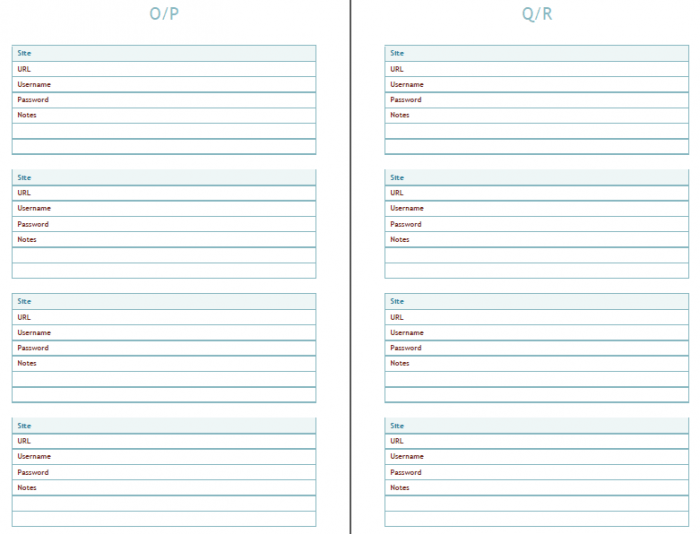
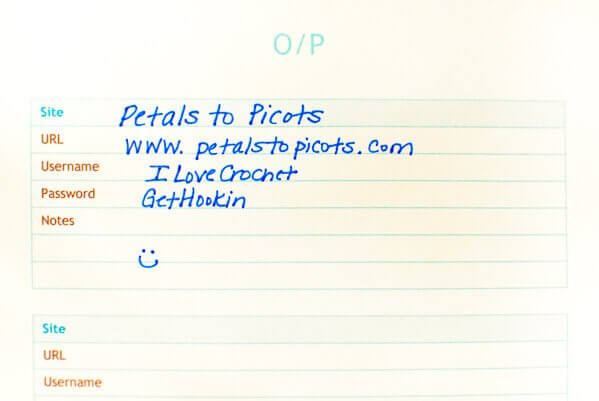
… with enough room to record all the information you need …
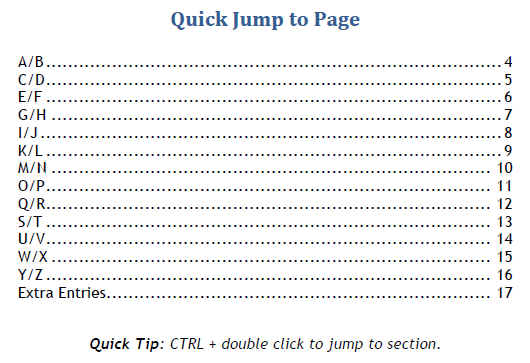
You can either print it out into a booklet to write in or use it electronically on your computer. I even included a hyperlinked table of contents so you can jump right to the section you need.
Hope it helps you as much as it has helped me! Click on one of the links below to download the free printable … you can download it in Word or pdf format, or both if you want …
Enjoy!

Is there a Mini Binder Version of this?
Thank you
Jessie Lynn Lovell
Love the password book–just what I was looking for AND I do plan to keep it on my computer. I don’t have anything that is that big of a secret. HOWEVER, I need to add a page/pages to some of the alphabetical pages. I know it will mess up the wonderful hyperlinked index, but I think I can fix that. Just not sure how to sandwich in a new page in the middle of my awesome book of passwords!! Thank you so much for this. I know it was a lot of work. ~Blessings, Tish
Hi Tish 🙂 So glad you found it useful! I still use mine and it helps keep me very organized. Since I print mine out I can just print out a page at a time to add to my book. It’s been quite awhile since I put this together so I’m not sure how to do it digitally.
I really love this password book; I’ve been using it for 2 years. I just happened to have a
9 1/4 x 7 1/4 three-ring binder when I found your free printouts. Since my notebook is smaller than normal, it was not an option to make the holes with a 3-hole punch – those are sized for normal sheets. So after I cut the pages to fit using my paper cutter, I then punched holes in one of the pages, put reinforcement labels around the holes and used that as my template to mark the others pages. I wanted to be sure all the holes were in the same place on each page.
Try to use only pencil if you can keep a designated pencil and eraser with the book it might keep you from grabbing a pen when you’re in a rush. I learned that the hard way! haha!
Another thing that might help others: I had trouble trying to print these out using my Firefox browser – it would print over to the left of the page. So I switched back to Safari (Apple’s browser) and it printed out fine.
So, thank you, Petals to Picots, for making and posting this and making it free!
I love your Password Book and have been using it. I even mentioned it in my Blog.
Nice idea, but this is the worst way to save these important informations.
Thank you for sharing!
Kara –
This is such a useful resource! Thank you for sharing! One question – is there a way to change it so that it prints one page on an 81/2 by 11? I would like to keep mine in a 3 ring binder.
Thanks!
Jennifer
This is great! Thanks for sharing!
Just found this now. I can’t tell you how much I appreciate this. I have passwords scribbled all over the place. Oh to have them all in one place!! Thank you.
Alison
Dublin, Ireland
We featured you on the Project Stash!
Yay!! Thanks so much, Marilyn!
Fantastic, you little organizational freak! I love your site and everything about it, but the way it’s organized is so user-easy. Thanks for yet another great tool.
Boo
Thanks, Boo 🙂
Thank you, thank you, THANK YOU!! I keep mine unorganized in an excel folder and just the other day when I went in to make some changes I thought I REALLY need to have an more organized file!! So you’ve done the work for me!!
BLESS YOU!!
I completely understand, Sharon! That is where I was at when I finally buckled down and made this 🙂
I can definitely use this. Right now, I have them all on stickies on my computer and I have to search for them every time. But more than that, I LOVE crochet so I’m so happy I found your site!
I’m happy you found it too, Allison 🙂
Are you serious? Not a good idea at all! Never write your passwords down, guys!
Then how do you suggest people remember passwords to several different sites? It’s way too time consuming to reset them every time and it’s even more unsafe to make all your passwords the same. If you keep it at home, in a safe spot, it should be fine.
I agree 🙂
I know that is was is advised but I honestly can’t remember all the different variations of user names and passwords and secret questions that I have created. This is the only way I manage to keep it all straight 🙂
Great idea! I know it’s totally against the password rules, but I don’t know anyone who can keep all these in their head! At work, we used to have to change our main password every 90 days, and they couldn’t resemble our last 12 passwords or something.
You know me, ChiWei … always breakin’ the rules, lol 😉
This is great and especially since I’m having to change all my passwords with the recent Heartbleed virus, this will be super helpful!
So glad you find it helpful, Emily!
Thanks for this excellent idea. I seem to spend half my time punching in different name and password combinations while cursing to myself when it tells me I’ve got it wrong again.
I know the feeling!! So glad you find it helpful 🙂
This is very nice, and much appreciated, but I want to point out that it isn’t safe to store a document like this on your computer unless you know how to protect it massively. It’s much safer to use an app like Last Pass, which is free, and stores your passwords for you. There are others too.
Good point about storing storing them on the computer itself, Gillian! I actually printed it out and use it to write passwords on. I have never tried a password app but they make me nervous … maybe someday.
I TOTALLY need this…
Hehe … so glad you like it!
this is seriously awesome! I need to get better about changing my passwords (got hacked big time a month ago) but i struggle to keep track of them all–and then the piece of paper I wrote them on! Soooo using this!
So happy it will be a help to you. I know what you mean!
Kara, I am a recent subscriber to your newsletter and an avid crocheter. I just love your newsletter. You have the coolest things on it as is proof of this password book. Thanks so much for such a useful tool.
Awww … that is so sweet of you to say, Joan! Makes me so happy to hear 🙂
I totally love this! Do you have one like it but an address book? I love that it is on my computer and I don’t have to print it! AMAZING!
I am so glad you like it Andrea! I don’t have one offhand but I will try to see if I can pull one together 🙂
YOU are an absolute angel. I cannot thank you enough. I have shared on FB and Pinterest. I just wish I could return the favor. I had to go the PDF route as I have no printer, but I am absolutely delighted. Best regards, Evelyn Q
I am so glad you find it helpful, Evelyn!!! That is all the thanks I need 🙂
thank you! this will be very handy, exactly what I have been needing.
So glad to hear it!